Elevate Your Analysis with the Advanced Screener
Unlock the full potential of your investment analysis with our Screener feature. Designed for precision and flexibility, the Screener lets you filter through vast datasets to focus solely on the securities that meet your criteria. Imagine crafting a custom list of tickers that align perfectly with your investment strategy—our Screener makes this a reality.
Navigate with Ease
Effortless Exploration
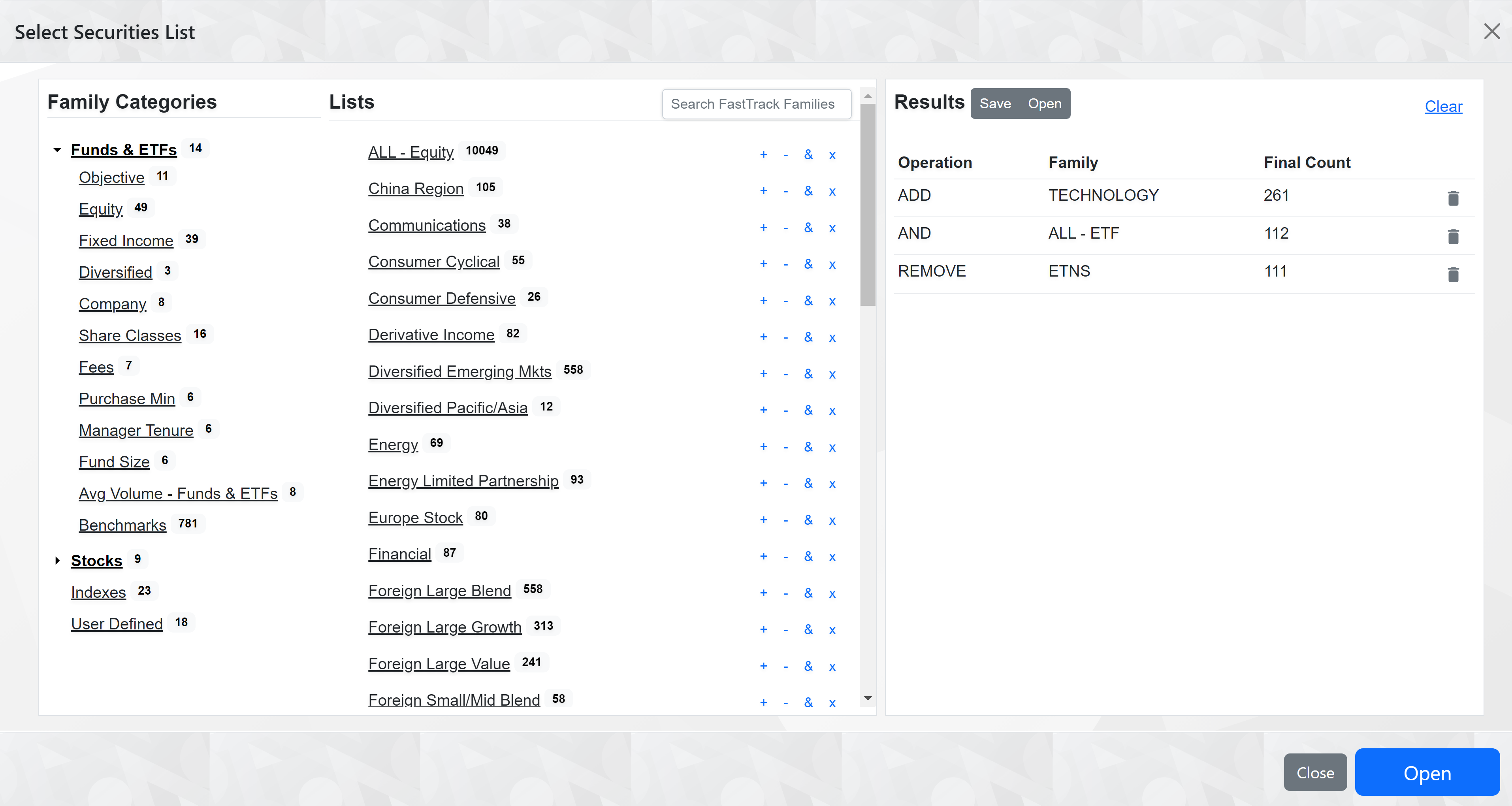
The Screener is intuitively divided into three columns for streamlined navigation:
Family Categories: Start by exploring broad groupings within our extensive collection of FastTrack pre-built families. Dive into categories like Funds & ETFs, Stocks, Indexes, and User-Defined selections to begin your journey.
Lists: Delve deeper based on your initial category selection. This column reveals a detailed breakdown, allowing you to refine your search further. Each family here comes with powerful tools to modify your results dynamically.
Results: Witness the culmination of your selections—a tailored list of tickers that align with your unique investment criteria. This final column not only showcases your custom list but also empowers you with operations to further fine-tune your selection.
Precision at Your Fingertips
Dynamic Family Interaction
With a simple click, expand family categories to uncover specific lists. Notice the numbers indicating the breadth of each family, guiding you through the hierarchy with clarity.
Tailor Your Ticker List
Leverage the four distinct buttons next to each family to craft your perfect list of tickers:
- Add (+): Enrich your list by including additional tickers from selected families.
- Subtract (-): Refine by removing unwanted tickers.
- Intersect (&): Focus sharply by keeping only tickers present in both the selected family and your existing list.
- Exclude (x): Eliminate tickers found in both your list and the selected family, ensuring your list is precisely honed.
For a visual understanding of how these operations work together, explore our interactive diagram: Operators Explained
Discover with the Search Box
Dive into our family database with the search box, designed to help you find securities with common traits quickly. Type in a ticker, and instantly see all families containing it—simplifying your quest for similar investments.
Search Box
Search the list of families using the search box. Search scans the family name as well the tickers included in the family.
Find Similar Securities with Search Box
All tickers in a family have something in common, so Voila!, you have a family of similar tickers.
Results: Your Customized Investment Lens
The Results column is where your strategy takes shape. Observe the operations applied, identify the families interacted with, and review the final count of tickers that have passed through your personalized screener. Utilize the trashcan icon to maintain a clean and relevant list by removing any unwanted results.
Save and Recall Your Strategy
Crafting the perfect screener setup is an art—save your masterpieces for future use. With our save and open options, your carefully built screeners are ready to be deployed anytime, ensuring your analysis is always sharp, focused, and aligned with your investment goals.