Alerts Manager
Empower your investment strategy by setting up personalized alerts based on critical market movements. The Alerts Manager is your control hub to configure, monitor, and manage all your alert preferences.
Overview
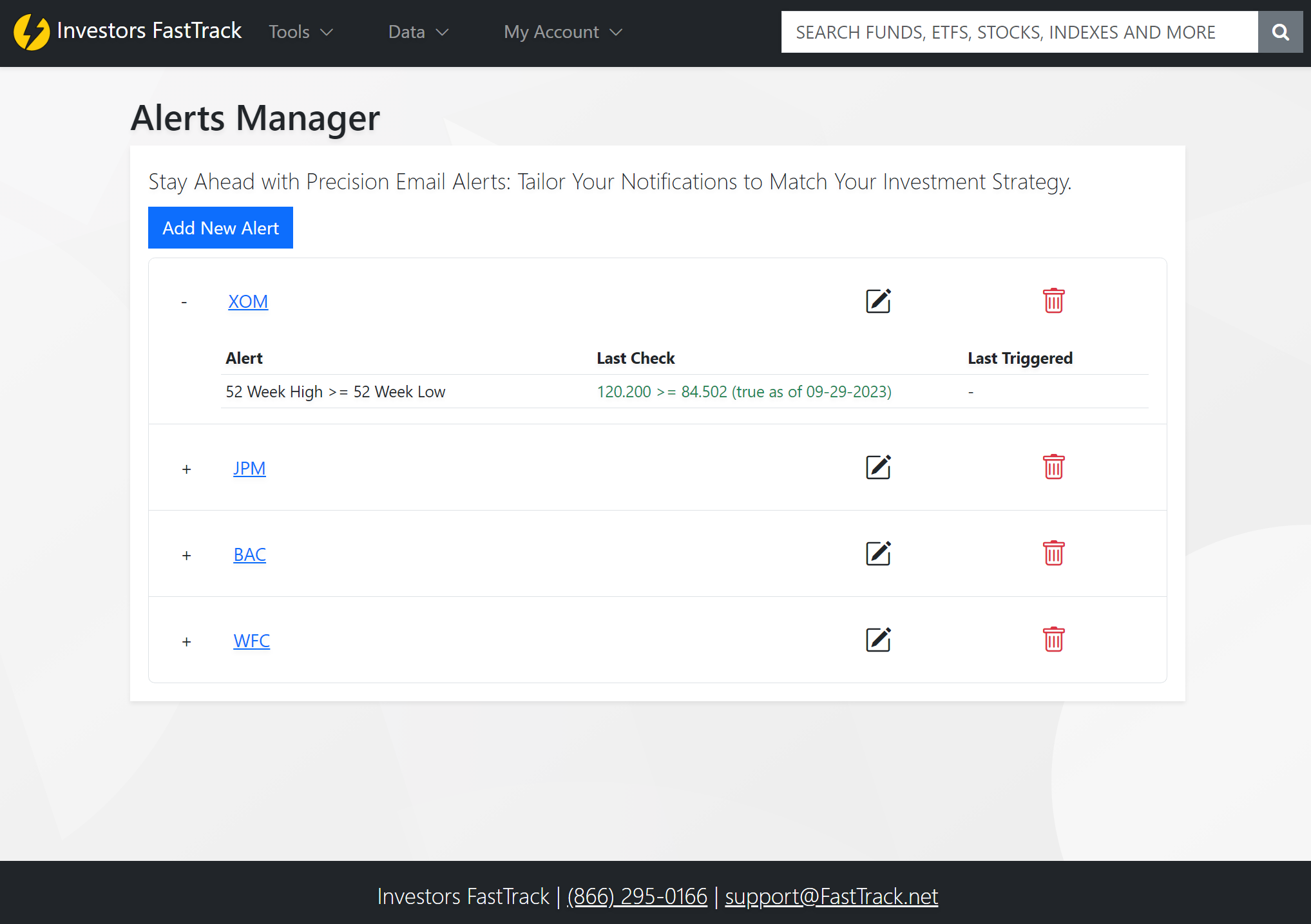
With the Alerts Manager, you can quickly add new alerts, keep an eye on active ones, edit existing configurations, or remove alerts that are no longer relevant.
Features and Navigation
Add New Alert: A primary button that leads you to the alert configuration page, allowing you to specify precise conditions for your alerts.
Active Alerts List: Beneath the 'Add New Alert' button is a comprehensive list of all your active alerts with the following columns:
- Expand Button: Dive deeper into each alert's details.
- Ticker Symbol: The asset you're tracking.
- Last Check: Provides two insights:
- The last time the alert was calculated.
- A clear indication if the result was true or false.
- Last Triggered: Know the exact day the alert toggled between true and false, triggering an email notification.
- Actions:
- 📝 Edit (Pencil Icon): Modify alert configurations.
- 🗑️ Delete (Trash Can Icon): Remove the alert.
Configuring a New Alert
When you click on the 'Add New Alert' button:
- Modal Presentation: A form titled "Create New Alert" appears.
- Ticker Entry: Begin by specifying the ticker symbol.
- Stat Selection:
- Left-side Stat & Right-side Stat: Set the two stats to compare.
- Condition Dropdown: Choose between 'greater than or equal to' and 'less than or equal to' to formulate your alert equation.
- Add Alert Button: On the right, this button adds the configured alert to a list below in the modal.
- Existing Alerts: All alerts linked to the entered ticker are displayed, providing a holistic view.
- Save & Cancel: Commit your configurations or discard changes.
Alert Preview
For a quick glimpse into the specifics of each alert, simply click on any alert within the Active Alerts List to see a detailed preview of its settings.
Stay informed and proactive with the Alerts Manager, refining your approach as the market evolves.